What Is an API Key? What Is an Access Token? And Why Setting Up Claude Code Takes So Many Steps
There is also a question of why we don't need the Anthropic API keys. So what is the Claude Console for, and when would we ever need it?
The first learning curve of Claude Code is the setup. This is where most of the learners said they “puked blood”. I get common questions like what API keys and auth are, and why there are so many steps.
There is also a question of why we don’t need the Anthropic API keys. So what is the Claude Console for, and when would we ever need it?
If you are not a developer, API keys and access tokens are probably the most confusing part of setting up Claude Code. You can build a whole website with Claude Code and never touch the code. But the moment you want it to send an email, connect to a domain, or talk to another service, it asks you for an “API key”, and the screen suddenly feels like a different language.
So I thought it would be good to write an article about this.
The first learning curve of Claude Code is the setup
Most people expect the hard part to be the building. It is not. With AI, the building is mostly chatting with AI. The first wall you hit, especially the first time, is the setup. And setup is usually a long list of one-time steps: install this, log in to that, create an account here, grant access there.
One curious question usually comes up. Why do techies seem to breeze through the same setup in minutes?
The short answer is that a developer’s laptop is already set up all along.
Onboarding Claude Code is like onboarding a new employee
Here is the way I think about it. Onboarding Claude Code, or any AI agent, is like onboarding a new employee.
Imagine a capable new hire joins your team on Monday. Smart, willing, ready to work. But on day one they cannot actually do anything. They have no email account. No laptop login. No access card for the building. No access to your CRM, your shared drive, or your billing system. Before they can be useful, you have to grant them access to each of the things you want them to work with, one at a time.
Claude Code is the same. It is a capable worker that just joined your team. Before it can do real work for you, you have to give it access to the things you want it to touch: your code on GitHub, your hosting on Cloudflare, your email service for sending mail. Each of those is a separate grant. That is why setup has so many steps. You are not configuring one thing. You are handing over a set of keys, one per system.
This also explains why developers onboard new tools so fast. It is not skill. It is that their laptop is already set up. The accounts exist. The access was granted months or years ago. When a developer tries a new tool, they install it on a laptop that is already set up. You, doing this for the first time, are setting up all of that access from scratch. You are not slow. You are doing every step once, by hand, from scratch.
I have a phrase I keep coming back to: manage AI like you manage people. Granting access is the first place that shows up.
So what is an API key? And an access token?
An API key and an access token are two common ways to grant access. Both let one system use another system.
That is the whole idea. Your website needs to send a welcome email, but it cannot send email by itself. So it asks a service like Resend to do it. Resend needs to know the request is really coming from your website, so you create a Resend API key for your website. Your website includes that key with every request, and Resend says, “I recognise this, go ahead.” It is like the staff login you issue to a new hire so they can use a specific tool.
In our workshop, most of this access is granted before we even start building, through a step-by-step guide learners follow on their own. Here is what gets connected, and which kind each one is:
- Claude Code to your Claude account: an access token. You log in once in the browser, and Claude Code receives a token so it can use AI on your subscription.
- The GitHub CLI to your GitHub: an access token. A one-time browser handshake so it can create your repository and push your code on your behalf.
- Wrangler to your Cloudflare: an access token. You sign in once so Cloudflare’s deploy tool can publish your site live.
- Your website to Resend: an API key. The one place you create a key by hand and paste it in, so your site can send email.
Three browser logins and one key you paste in yourself. Same idea, granting access, with slightly different mechanics.
More questions from learners worth highlighting
“So what is the difference between an API key and an access token?”
They do the same job: grant access. They differ in how you get them.
An API key is a long secret string you copy from a dashboard and paste into your project. You manage it yourself, like a password you were handed.
An access token is usually given to your software automatically after you log in. Remember the first time you ran Claude Code and it asked you to log in to your Claude account? That login returned an access token to Claude Code on your laptop. That token is what lets the tool on your machine call the Claude servers to do the AI work. You never saw it, and you never copied anything. It was granted quietly when you signed in, the way a single company sign-in can unlock several tools at once.
“Then am I using an Anthropic API key when I run Claude Code?”
No, and this is the part that trips most people up. When you run Claude Code through a Pro or Max subscription, you are not using a pay-per-use API key at all. You logged in once, you got an access token, and the tool draws on your fixed monthly subscription. That subscription is heavily subsidised right now. Going through the Claude Console with an API key instead is pay-per-use, and at the moment that works out at roughly ten times more expensive for the same work.
“Does every API key cost money?”
No. An API key is just a way to grant access. Whether it costs money depends on the service, not the key. In our workshop the Resend key sits on the free tier, so the website can send a reasonable number of emails for free. Other services charge per use. The key itself is neutral. The service behind it decides the price.
“So when do I actually need an API key?”
It comes down to this: the moment your project needs to work with another service, you need a key for it. Sending email needs a key for the email service. Connecting a custom domain needs access to the hosting service. If that work also needs AI, then you might need an AI key too. Until then, you do not need any of this. A plain website that just shows information needs none of it.
Onboarding also means setting boundaries
You would not hand a new employee the master key to everything on day one. Same with an AI agent. A key grants real access to your accounts, so a leaked key is a real problem. A few rules I drilled into the cohort, all learned the practical way.
Never commit a secret key into a Git repository and push it to GitHub. Do not assume a key is safe just because the repository is private.
If a key ever does get committed, even once in your history, delete it and create a new one. When people in the cohort asked what “revoke the key” means, that is exactly it: delete the old key in the dashboard so it stops working, then issue a fresh one. The same way you would deactivate a former employee’s access card.
If you are using a pay-per-use API, set a spending limit. A leaked key with no limit can run up a four or five figure bill before you notice. A spending cap turns a disaster into an annoyance.
And then you get a new laptop
This is the friction that surprises people most.
You do all of this onboarding once, and it feels permanent. Then you switch to a new laptop and your project does not work, because all of those keys lived on the old machine and never moved. The code came across through GitHub. The keys did not, because you correctly kept them out of GitHub. It is a bit like your new hire losing every login and having to be onboarded from scratch.
So back up your key files somewhere safe, separate from your code.
Why this is worth pushing through
The setup is genuinely the steepest part. It is a pile of one-time tasks that developers already finished long ago, which is the only reason they look faster than you. Onboard your AI agent once, understand what each key actually grants, learn to keep it safe, and the wall turns back into what it always was: a checklist. After that, the building is the easy part.
If you want to get through this setup with a clear step-by-step guide, and then build a real website with it, this is exactly what my Foundations of Claude Code workshop is for. It is built for non-techies. You walk out with a live website on a real URL, the keys set up safely, and the foundational understanding to keep going on your own. My next cohorts are on 18 June and 2 July at the Hashmeta office in Singapore.
Details: https://boonkgim.com/workshops/foundations-claude-code/
#AI #ClaudeCode #VibeCoding #BuildInPublic #NoCode
Enjoyed this? Subscribe for more.
Practical insights on AI, growth, and independent learning. No spam.
More in Vibe Coding
Hot Take: Vibe Coding Won't Replace Software Engineers
Here, I share my journey from a strong believer to a skeptic.
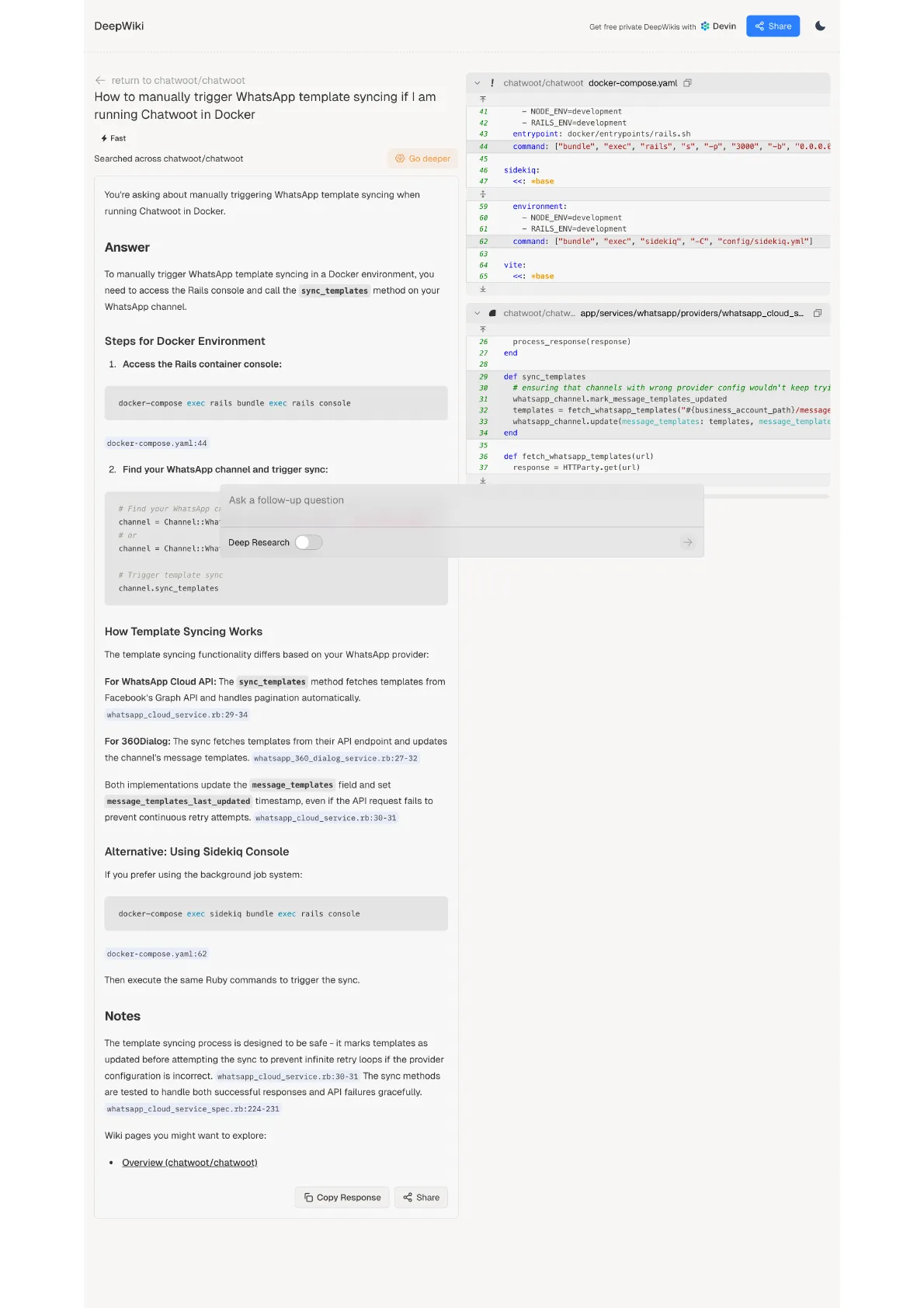
DeepWiki: AI-Generated Docs for Any GitHub Repo
If you're using open-source software, one of the most common problems is outdated or poor documentation.
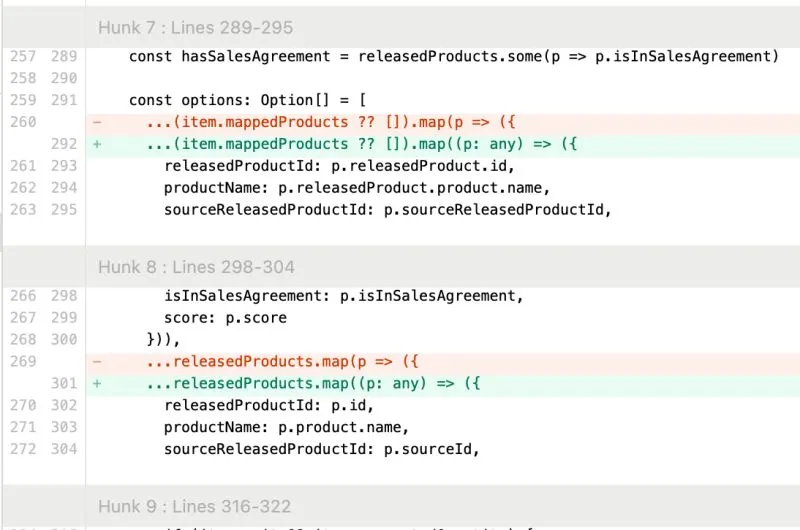
I caught Cursor trying to be lazy.
The AI agent couldn’t solve the typing error, so it cast the variable to 'any' to suppress the error, just like a sloppy software engineer would.

OpenAI’s Windsurf deal is off — and Windsurf’s CEO is going to Google
Anyone feel like we should use AI to create a drama and publish it on Netflix?
Vibe coding is a double-edged sword.
In the wrong hands, it's a security nightmare. In the right hands, it's a powerful security assistant.
I used to spend extra time writing detailed comments in my Git commits.
Not just about what changed, but why — so my team could learn from the reasoning behind my code. It also serves as a reference for my future self.
Hot Take: Vibe Coding Won't Replace Software Engineers
Here, I share my journey from a strong believer to a skeptic.
I caught Cursor trying to be lazy.
The AI agent couldn’t solve the typing error, so it cast the variable to 'any' to suppress the error, just like a sloppy software engineer would.
Vibe coding is a double-edged sword.
In the wrong hands, it's a security nightmare. In the right hands, it's a powerful security assistant.
DeepWiki: AI-Generated Docs for Any GitHub Repo
If you're using open-source software, one of the most common problems is outdated or poor documentation.
OpenAI’s Windsurf deal is off — and Windsurf’s CEO is going to Google
Anyone feel like we should use AI to create a drama and publish it on Netflix?
I used to spend extra time writing detailed comments in my Git commits.
Not just about what changed, but why — so my team could learn from the reasoning behind my code. It also serves as a reference for my future self.