Claude Code is for software developers, and OpenClaw is more for business users.
A learner said this to another learner during a recent workshop. I think this is the most common and most dangerous misconception about these two tools.
“Claude Code is for software developers, and OpenClaw is more for business users.”
A learner said this to another learner during a recent workshop. I think this is the most common and most dangerous misconception about these two tools.
The conversation
Three things happened in a recent session.
Learner A: “I prefer Claude Code over OpenClaw. It is easier to install and use.”
Me: “I actually recommend people to learn Claude Code before OpenClaw. But most are interested in OpenClaw first.”
Learner B: “Claude Code is for software developers, and OpenClaw is more for business users.”
Learner A, I agree with. Learner B, I can’t disagree more.
Not because the statement is slightly off. The framing is backwards. And it matters, because this framing leads people to skip the foundation and jump straight to the wrapper.
“Terminal” does not mean “coding”
I think the confusion starts with the terminal and the “Code” in the name.
Claude Code runs on the terminal - a black screen with white monospace text. And the name has “Code” in it. To a non-technical person, that looks and sounds like a developer tool.
It was originally designed for coding. But many people including me now use it far beyond coding.
But what Claude Code actually does is give AI direct access to your computer. It reads your files. It writes output directly to your folders. It browses the web. It installs tools. It runs workflows.
The terminal is just the interface. The power is the access.
I use Claude Code for 99% of my AI work. Here is what a typical week looks like:
- LinkedIn posts, articles, cover images, carousels
- Marketing briefs, proposals, SEO audits
- Presentations and workshop materials
- Research and competitive analysis
Most of it is not coding.
Calling Claude Code “a tool for developers” because it runs on a terminal is like calling Excel “a tool for accountants” because it has spreadsheets.
OpenClaw is not a business tool
This is probably the more controversial part.
OpenClaw looks business-friendly in demos. You message your agent from WhatsApp. It responds when it’s done. It reads your emails, manages your calendar. Impressive.
But to get to that point, you need to:
- Set up and maintain a server that runs 24/7
- Configure messaging platform APIs (WhatsApp Business API, Telegram bot tokens, etc.)
- Manage API keys, credentials, and environment variables
- Handle the security implications of giving an AI agent elevated permissions on your machine
- Monitor costs - the default heartbeat alone can cost $50/day if misconfigured
- Vet third-party skills manually, because about 20% of ClawHub’s skill registry was found to contain malicious code
- Fix bugs when the OpenClaw agent breaks itself
- Deal with regular OpenClaw updates that break things
Some cloud vendors promise one-click setup. But when things break, you still need to SSH into a terminal to fix it. The setup is the easy part. Maintaining it is the tough part.
None of these are “business user” tasks. They require technical understanding. I think they require more technical understanding than installing Claude Code, which is one command in the terminal.
The right mental model
We can think of Claude Code as a reactive AI agent. You give it a task, it does it. You ask a question, it answers. You interact with it directly on your computer.
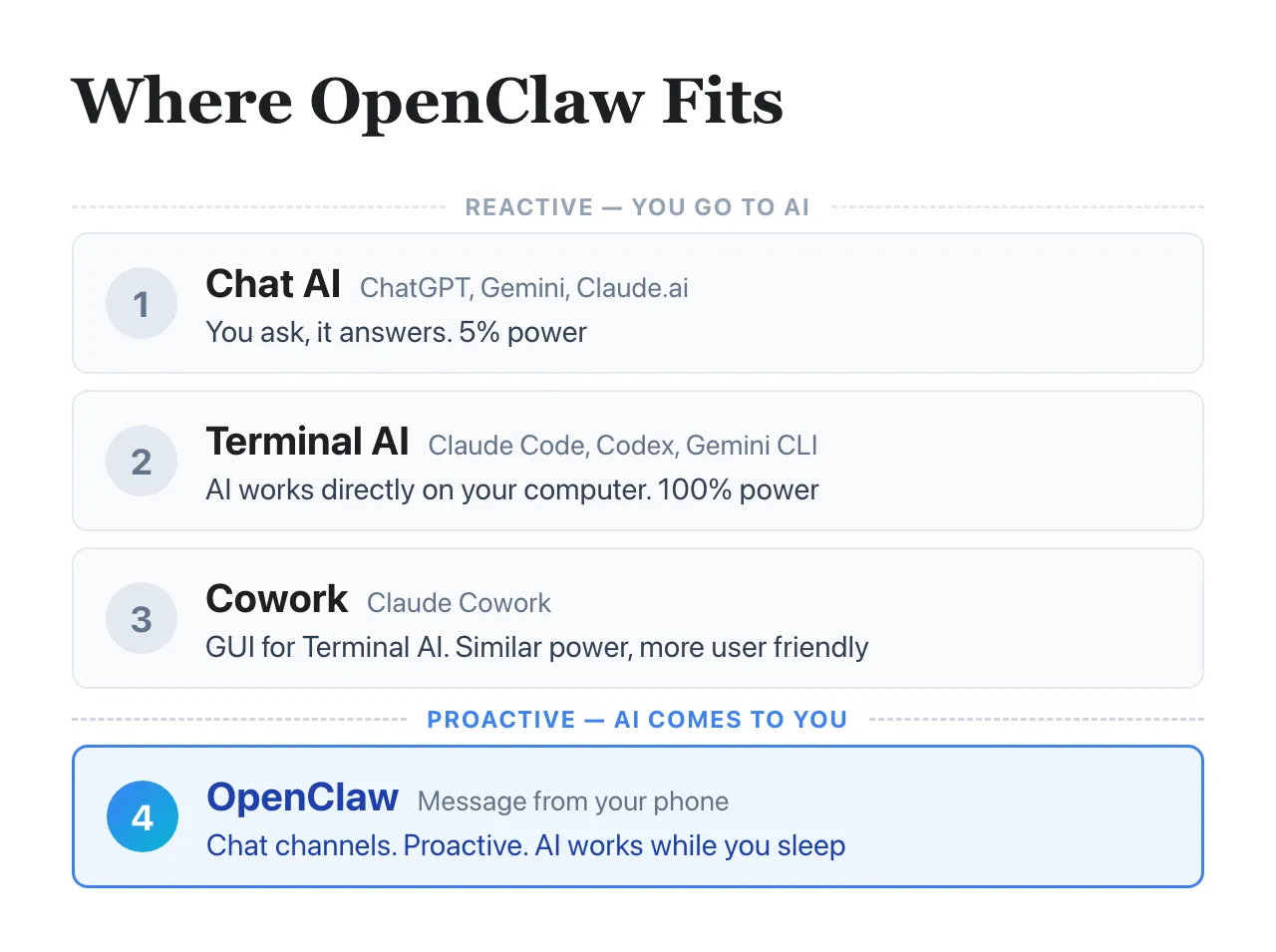
In my workshop, I use a four-layer framework to show where each tool fits.
The first three layers are reactive - you go to the AI. Chat AI (ChatGPT, Gemini) gives you about 5% of what AI can do. Terminal AI (Claude Code) gives you 100% - it works directly on your computer, reads your files, runs workflows. Cowork is the same 100% power wrapped in a GUI for people who don’t like the terminal.
The fourth layer is proactive - AI comes to you. OpenClaw sits here. It wraps a reactive agent and makes it proactive, reachable through WhatsApp or Telegram, always on even while you sleep.
Notice what this means: OpenClaw is not a replacement for Claude Code. It is a layer on top. Underneath, you are still talking to the same type of AI reasoning engine.
If you don’t understand the foundation, you can’t orchestrate the agent effectively.
Orchestrating AI agents is mostly about creating, running, and improving skills. This is a hands-on craft. And the tighter the feedback loop, the faster you learn it.
Why Claude Code first
I recommend learning Claude Code before OpenClaw for four reasons.
1. It gives you the tightest feedback loop for orchestration.
Write a skill, run it, see what happens, improve it. All on your computer, no extra infrastructure in between. That is how you learn to instruct an agent, review its work, set guardrails, and recognize when it is drifting. These skills transfer to every AI tool, OpenClaw included.
2. It is actually easier to start with.
One command to install. No server to maintain. No messaging API to configure. No Docker, no webhook configuration, no port forwarding. You are talking to AI on your computer within minutes.
For a “business user tool,” OpenClaw’s onboarding is surprisingly technical. For a “developer tool,” Claude Code’s onboarding is surprisingly simple.
3. It makes OpenClaw better when you are ready.
Those who get the most out of OpenClaw are those who already know how to use Claude Code well. Why? Because they know how to create better skills. Skills are the unit of work for both tools, and the people who craft them well get dramatically better results from whichever wrapper they plug into.
4. Claude Code can actually help you fix OpenClaw when you are stuck.
When your OpenClaw setup breaks, just launch Claude Code from your OpenClaw config folder and tell it what’s wrong. It figures out a lot on its own - finds the error logs, reads the config, diagnoses the issue. But this only works if you already know how to use Claude Code well.
The pattern that worries me
If you believe “Claude Code is for developers, OpenClaw is for business users,” you will probably:
- Skip Claude Code because you think it is not for you
- Jump to OpenClaw expecting a plug-and-play business tool
- Hit technical walls you don’t have the foundation to understand
- Conclude that “AI agents don’t work” and move on
I have seen this pattern in my workshops more than once. The people who struggle most with OpenClaw are the ones who skipped Claude Code.
The people who get the most out of both tools almost always learned Claude Code first.
My recommendation
If you are a founder or business operator who went straight to OpenClaw, I think you missed a step. Go back to Claude Code. Spend a week using it for your actual work - not coding, just your regular tasks. Marketing briefs. Research. Content. Proposals.
If you haven’t tried either yet, start with Claude Code. The terminal is not as intimidating as it looks. And the understanding you build there makes everything else - OpenClaw included - easier to use well.
If the terminal still feels too intimidating, try Claude Cowork. It wraps Claude Code with a nice GUI. Same engine, friendlier surface. You still get the direct feedback loop and all the fundamentals - just without the black screen.
This is not about avoiding OpenClaw. You should still learn and try it. It is about the sequence. Claude Code first, OpenClaw second.
#AI #ClaudeCode #OpenClaw #AIAgents #SoftwareEngineering
Enjoyed this? Subscribe for more.
Practical insights on AI, growth, and independent learning. No spam.
More in Vibe Coding
Hitting your AI coding usage limit feels like reaching the climax of a drama series and having to...
You’re full of ideas, but suddenly on hold until next day.
LangChain on AI Agents vs Workflow Builders
(I admit, I’ve contributed to one of those posts myself)

Don't make the same marketing mistake as Nike.
Nike lost $60 billion in market cap chasing performance marketing.
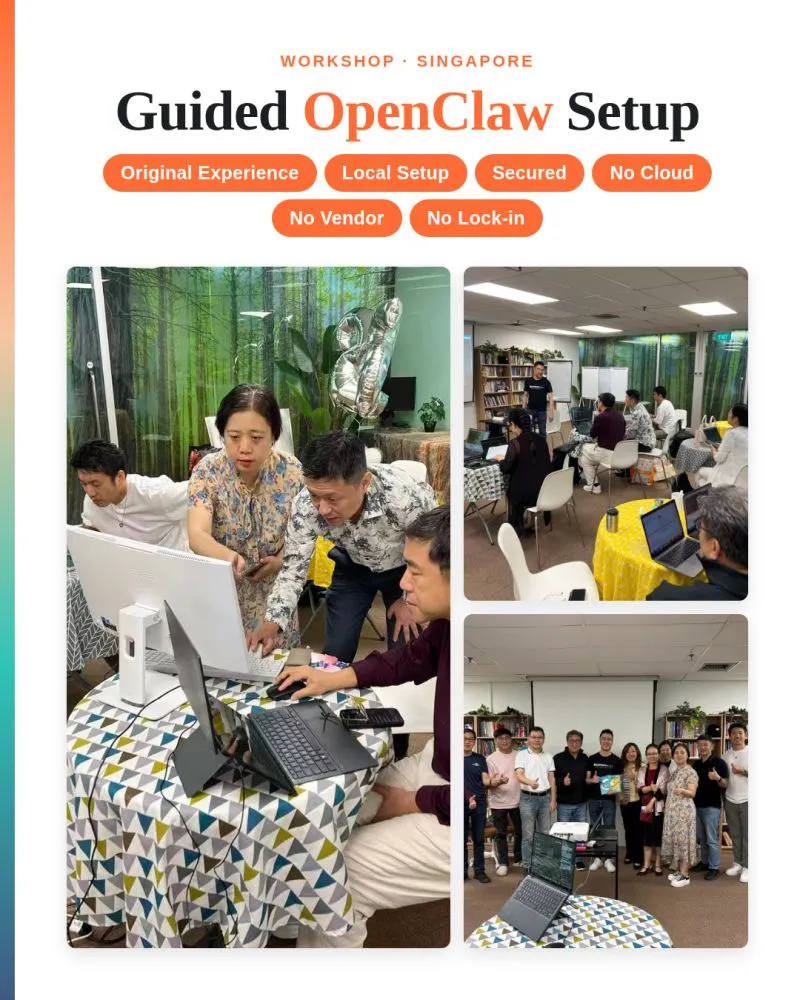
Most OpenClaw workshops skip the fundamentals and teach you 1-click setup on AI or cloud providers...
I decided to go for a different path. In my workshop, I guide learners to set up with the original experience: install it on your laptop, but with security i...
Does AI have empathy? I asked Claude a simple product question.
The answer surprised me.
How to connect Claude Code to Telegram the official way after Anthropic banned OpenClaw.
Recently, some learners asked me how I connected my Claude Code to Telegram after Anthropic banned OpenClaw.
Hitting your AI coding usage limit feels like reaching the climax of a drama series and having to...
You’re full of ideas, but suddenly on hold until next day.
Most OpenClaw workshops skip the fundamentals and teach you 1-click setup on AI or cloud providers...
I decided to go for a different path. In my workshop, I guide learners to set up with the original experience: install it on your laptop, but with security i...
How to connect Claude Code to Telegram the official way after Anthropic banned OpenClaw.
Recently, some learners asked me how I connected my Claude Code to Telegram after Anthropic banned OpenClaw.
LangChain on AI Agents vs Workflow Builders
(I admit, I’ve contributed to one of those posts myself)
Don't make the same marketing mistake as Nike.
Nike lost $60 billion in market cap chasing performance marketing.
Does AI have empathy? I asked Claude a simple product question.
The answer surprised me.